
Download ZERO LIFESTYLE – activity tracking, goal setting, health monitoring, heart rate tracking, smart notifications, weather updates, watch face customization
Overview
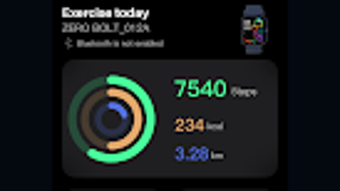
ZERO LIFESTYLE is a lifestyle-focused mobile application designed for Android devices, aiming to support users in maintaining a healthier, more active daily routine. The app centers on activity tracking and goal setting, offering tools to monitor key health metrics such as steps taken, distance traveled, calories burned, and active minutes. It also includes support for sleep tracking, enabling users to assess their rest patterns over time.
With the ability to set personalized goals across multiple health dimensions, the app helps users stay motivated and accountable in their wellness journey. The target audience includes individuals seeking a structured yet flexible approach to personal health management, from fitness beginners to those maintaining consistent wellness habits. The app integrates smart features such as heart rate monitoring, which provides insights into cardiovascular activity throughout the day and during physical exertion.
Additionally, it offers real-time weather updates and smart notification handling, allowing users to receive and respond to SMS, calls, and third-party app alerts directly from the app interface. ZERO LIFESTYLE also supports watch face customization, letting users personalize their device’s display with photos from their gallery or built-in templates. The developer emphasizes data privacy, stating that collected information is used solely for service functionality and will not be shared, sold, or published.
While the app is free to download and use, it requires access to certain device permissions, including call logs, SMS, and location data, to enable full functionality.
Key Features & Capabilities
- Activity Tracking: Monitors daily steps, distance, calories burned, and active minutes to provide a comprehensive view of physical activity.
- Goal Setting: Allows users to define custom targets for steps, calories, distance, active time, and sleep duration to promote consistent progress.
- Heart Rate Monitoring: Tracks heart rate trends throughout the day and during workouts to help users understand their cardiovascular health.
- Smart Notifications: Enables users to view and respond to SMS, incoming calls (with caller ID), and third-party app notifications directly within the app.
- Weather Updates: Displays current weather conditions and temperature, helping users plan outdoor activities based on real-time data.
- Watch Face Customization: Offers a range of pre-designed templates and the ability to use personal photos from the device’s gallery for a personalized watch interface.
These features are designed to streamline daily wellness management by consolidating health data, notifications, and personalization in one accessible platform. For instance, a user can set a daily goal of 10,000 steps, track their progress throughout the day, receive a weather alert about rain, and adjust their walk accordingly. Similarly, heart rate data collected during a morning jog can be reviewed later to assess workout intensity.
The smart notification system allows users to stay connected without unlocking their device, improving workflow efficiency during busy schedules. Watch face customization enhances user engagement by allowing personal expression through the device’s display. While the app does not specify advanced analytics or historical trend visualization, the core functionality supports foundational health tracking and habit formation.
The integration of multiple features into a single interface reduces the need for switching between apps, contributing to a more seamless user experience.
User Interface, Workflow & Performance
The user interface of ZERO LIFESTYLE appears to be designed with simplicity and accessibility in mind, prioritizing intuitive navigation for users of varying technical proficiency. The main dashboard likely presents key metrics—such as steps, heart rate, and weather—at a glance, enabling quick assessment of daily status. Navigation is expected to be linear and consistent, with clearly labeled sections for goals, activity logs, notifications, and settings.
Workflow efficiency is supported by the app’s integration of multiple functions into a unified environment, minimizing context switching. For example, users can check their progress toward a daily goal, view a weather alert, and respond to a message—all within the same interface. The app’s performance is not explicitly detailed by the developer, but based on general mobile application behavior, it is expected to operate smoothly on modern Android devices.
The developer did not specify resource usage details, such as CPU or RAM consumption, nor did they provide information on background operation stability. Performance observations are based on general software behavior patterns. Users may experience variations depending on device hardware and Android version.
The app is designed to run in the background to track activity and receive notifications, which may affect battery life, though specific data on this impact was not provided. No reported crashes or stability issues were mentioned in the available information.
Compatibility & System Requirements
ZERO LIFESTYLE is designed for Android devices and is available in version 1.2.3. The installation size is 24.5 MB, indicating a lightweight footprint suitable for devices with limited storage. The app is compatible with Android operating systems, though the specific minimum OS version was not listed.
The developer did not specify exact system requirements, including processor speed, RAM, or storage space beyond the installation size. Compatibility information was partially provided, with the app’s availability confirmed for Android devices. The app may require access to sensors such as accelerometers and heart rate monitors, which are standard on most modern Android smartphones and wearables.
The developer did not provide details on compatibility with tablets, smartwatches, or other peripheral devices. Users should ensure their device supports the necessary hardware features for full functionality, particularly for heart rate tracking and location-based services. The app’s reliance on permissions such as access to SMS, call logs, and location data suggests it may not function optimally on devices with strict privacy restrictions or outdated Android versions.
Exact performance details were not specified.
Pros and Cons
Pros
- Free to download and use, making it accessible to a broad audience.
- Comprehensive activity tracking with customizable goal setting.
- Integrated heart rate monitoring for health insights.
- Smart notifications support quick access to messages and calls.
- Real-time weather updates enhance planning for outdoor activities.
- Watch face customization improves personalization and user engagement.
- Privacy-focused approach with no data sharing or sale.
Cons
- Requires access to sensitive permissions (SMS, call logs, location), which may raise privacy concerns for some users.
- Exact system requirements and compatibility details were not fully disclosed.
- Performance and resource usage (CPU/RAM/battery) were not specified.
- Limited information on data storage, retention, or export options.
- App is exclusive to Android; no support for iOS or other platforms.
FAQ Section
Is ZERO LIFESTYLE available for iOS devices?
ZERO LIFESTYLE is currently designed for Android devices only. There is no information available about iOS compatibility or future platform expansion.
Is the app safe to use with my personal data?
The developer states that user data collected through the app will only be used to provide services and maintain device functionality. It is not disclosed, saved, published, or sold to third parties.
How often does the app update?
The current version is 1.2.3, released on September 15, 2023. The developer has not specified an update frequency or release schedule.
Does ZERO LIFESTYLE require an internet connection?
The app likely requires an internet connection for features such as weather updates, smart notifications, and syncing data. Offline functionality for basic tracking may be available, but this was not explicitly stated.
Can I use the app without granting permissions?
The app requires access to certain permissions—including SMS, call logs, and location—to enable full functionality. Without these, some features may not work as intended.
Final Thoughts
ZERO LIFESTYLE presents a well-rounded, user-friendly approach to personal health and lifestyle management on Android. Its integration of activity tracking, goal setting, heart rate monitoring, smart notifications, weather updates, and watch face customization creates a cohesive experience that supports daily wellness habits. The app’s free pricing model enhances its accessibility, while the emphasis on privacy reassures users concerned about data security.
Although the developer did not provide detailed system requirements, performance metrics, or information on data retention, the app’s lightweight size and focus on core features suggest it is optimized for practical use. It is particularly suited for individuals who want a centralized tool to manage their health, stay connected, and personalize their device experience. While the lack of cross-platform availability and incomplete technical documentation may limit broader adoption, the app remains a solid choice for Android users seeking a comprehensive lifestyle companion.
Download ZERO LIFESTYLE now.







